> ## Documentation Index
> Fetch the complete documentation index at: https://docs.cloud.red/llms.txt
> Use this file to discover all available pages before exploring further.

# Incidents

> Incidents shows open, acknowledged, and a history of all alerts that have been triggered by Cloud.Red Monitoring

Monitoring alerts triggered for devices in the Cloud.Red Monitoring program are displayed in the Incidents tab. Here, they can be acknowledged or closed. Updates from the WorldTech IT team will also be visible within the incident.

<img className="block h-96 dark:hidden" src="https://mintcdn.com/cloudred/XLCPZIg1Q1S_lH4Z/native-monitoring/incidents-images/select-incidents-tab.png?fit=max&auto=format&n=XLCPZIg1Q1S_lH4Z&q=85&s=06d7c86dfa713d809d3dee527aff7edf" width="1537" height="727" data-path="native-monitoring/incidents-images/select-incidents-tab.png" />

<img className="hidden h-96 dark:block" src="https://mintcdn.com/cloudred/XLCPZIg1Q1S_lH4Z/native-monitoring/incidents-images/select-incidents-tab.png?fit=max&auto=format&n=XLCPZIg1Q1S_lH4Z&q=85&s=06d7c86dfa713d809d3dee527aff7edf" width="1537" height="727" data-path="native-monitoring/incidents-images/select-incidents-tab.png" />

Within Incidents, you can view open, acknowledged, and closed incidents.

<img className="block h-96 dark:hidden" src="https://mintcdn.com/cloudred/XLCPZIg1Q1S_lH4Z/native-monitoring/incidents-images/view-incidents.png?fit=max&auto=format&n=XLCPZIg1Q1S_lH4Z&q=85&s=4914723f8773ea05e481fbb2e3edd04d" width="1533" height="726" data-path="native-monitoring/incidents-images/view-incidents.png" />

<img className="hidden h-96 dark:block" src="https://mintcdn.com/cloudred/XLCPZIg1Q1S_lH4Z/native-monitoring/incidents-images/view-incidents.png?fit=max&auto=format&n=XLCPZIg1Q1S_lH4Z&q=85&s=4914723f8773ea05e481fbb2e3edd04d" width="1533" height="726" data-path="native-monitoring/incidents-images/view-incidents.png" />

<Note> **A complete list of the default alerts can be found under F5 Alerting.** </Note>

## Interacting with Incidents

Selecting the actions icon allows you to acknowledge or close an incident that is either open or previously acknowledged.

<img className="block h-96 dark:hidden" src="https://mintcdn.com/cloudred/XLCPZIg1Q1S_lH4Z/native-monitoring/incidents-images/incidents-actions.png?fit=max&auto=format&n=XLCPZIg1Q1S_lH4Z&q=85&s=4cf258754015cfd6710da43555940b82" width="1532" height="725" data-path="native-monitoring/incidents-images/incidents-actions.png" />

<img className="hidden h-96 dark:block" src="https://mintcdn.com/cloudred/XLCPZIg1Q1S_lH4Z/native-monitoring/incidents-images/incidents-actions.png?fit=max&auto=format&n=XLCPZIg1Q1S_lH4Z&q=85&s=4cf258754015cfd6710da43555940b82" width="1532" height="725" data-path="native-monitoring/incidents-images/incidents-actions.png" />

Acknowledging or closing the incident will move it to its corresponding tab.

<img className="block h-96 dark:hidden" src="https://mintcdn.com/cloudred/XLCPZIg1Q1S_lH4Z/native-monitoring/incidents-images/incidents-actions-options.png?fit=max&auto=format&n=XLCPZIg1Q1S_lH4Z&q=85&s=ba36620d281a2e67bfcaee6e58987280" width="1537" height="730" data-path="native-monitoring/incidents-images/incidents-actions-options.png" />

<img className="hidden h-96 dark:block" src="https://mintcdn.com/cloudred/XLCPZIg1Q1S_lH4Z/native-monitoring/incidents-images/incidents-actions-options.png?fit=max&auto=format&n=XLCPZIg1Q1S_lH4Z&q=85&s=ba36620d281a2e67bfcaee6e58987280" width="1537" height="730" data-path="native-monitoring/incidents-images/incidents-actions-options.png" />

In the module, leave a comment reflecting the current status of the incident, then select "Update" to complete the action.

<img className="block h-96 dark:hidden" src="https://mintcdn.com/cloudred/XLCPZIg1Q1S_lH4Z/native-monitoring/incidents-images/acknowledge-action.png?fit=max&auto=format&n=XLCPZIg1Q1S_lH4Z&q=85&s=d30f87ce8d2a9d08a70fe4163f9d48b8" width="1534" height="726" data-path="native-monitoring/incidents-images/acknowledge-action.png" />

<img className="hidden h-96 dark:block" src="https://mintcdn.com/cloudred/XLCPZIg1Q1S_lH4Z/native-monitoring/incidents-images/acknowledge-action.png?fit=max&auto=format&n=XLCPZIg1Q1S_lH4Z&q=85&s=d30f87ce8d2a9d08a70fe4163f9d48b8" width="1534" height="726" data-path="native-monitoring/incidents-images/acknowledge-action.png" />

To update multiple incidents simultaneously, select the checkboxes next to the respective incidents.

<img className="block h-96 dark:hidden" src="https://mintcdn.com/cloudred/XLCPZIg1Q1S_lH4Z/native-monitoring/incidents-images/select-multiple-incidents.png?fit=max&auto=format&n=XLCPZIg1Q1S_lH4Z&q=85&s=0ff880c674fd9243ada963ea8a1823b2" width="1534" height="728" data-path="native-monitoring/incidents-images/select-multiple-incidents.png" />

<img className="hidden h-96 dark:block" src="https://mintcdn.com/cloudred/XLCPZIg1Q1S_lH4Z/native-monitoring/incidents-images/select-multiple-incidents.png?fit=max&auto=format&n=XLCPZIg1Q1S_lH4Z&q=85&s=0ff880c674fd9243ada963ea8a1823b2" width="1534" height="728" data-path="native-monitoring/incidents-images/select-multiple-incidents.png" />

Use the "Acknowledge" or "Close" buttons in the top right to address the selected incidents.

<img className="block h-96 dark:hidden" src="https://mintcdn.com/cloudred/XLCPZIg1Q1S_lH4Z/native-monitoring/incidents-images/multiple-acknowledge.png?fit=max&auto=format&n=XLCPZIg1Q1S_lH4Z&q=85&s=67496bdfdc69fc63bcae201304c6c737" width="1535" height="725" data-path="native-monitoring/incidents-images/multiple-acknowledge.png" />

<img className="hidden h-96 dark:block" src="https://mintcdn.com/cloudred/XLCPZIg1Q1S_lH4Z/native-monitoring/incidents-images/multiple-acknowledge.png?fit=max&auto=format&n=XLCPZIg1Q1S_lH4Z&q=85&s=67496bdfdc69fc63bcae201304c6c737" width="1535" height="725" data-path="native-monitoring/incidents-images/multiple-acknowledge.png" />

To learn more about an incident, click the expand icon.

<img className="block h-96 dark:hidden" src="https://mintcdn.com/cloudred/XLCPZIg1Q1S_lH4Z/native-monitoring/incidents-images/expand-incident.png?fit=max&auto=format&n=XLCPZIg1Q1S_lH4Z&q=85&s=1ae734991b1951dfe4207bb53f55cc78" width="1534" height="726" data-path="native-monitoring/incidents-images/expand-incident.png" />

<img className="hidden h-96 dark:block" src="https://mintcdn.com/cloudred/XLCPZIg1Q1S_lH4Z/native-monitoring/incidents-images/expand-incident.png?fit=max&auto=format&n=XLCPZIg1Q1S_lH4Z&q=85&s=1ae734991b1951dfe4207bb53f55cc78" width="1534" height="726" data-path="native-monitoring/incidents-images/expand-incident.png" />

Here, the incident ID, severity, alert time, and last updated time are clearly visible.

<img className="block h-96 dark:hidden" src="https://mintcdn.com/cloudred/XLCPZIg1Q1S_lH4Z/native-monitoring/incidents-images/incident-expanded-view.png?fit=max&auto=format&n=XLCPZIg1Q1S_lH4Z&q=85&s=fdfbdc7cb6d6b9c85c7ab32db3fff874" width="1535" height="728" data-path="native-monitoring/incidents-images/incident-expanded-view.png" />

<img className="hidden h-96 dark:block" src="https://mintcdn.com/cloudred/XLCPZIg1Q1S_lH4Z/native-monitoring/incidents-images/incident-expanded-view.png?fit=max&auto=format&n=XLCPZIg1Q1S_lH4Z&q=85&s=fdfbdc7cb6d6b9c85c7ab32db3fff874" width="1535" height="728" data-path="native-monitoring/incidents-images/incident-expanded-view.png" />

Selecting 'LOAD UPDATES' will display all updates provided by team members and WorldTech IT engineers regarding the issue.
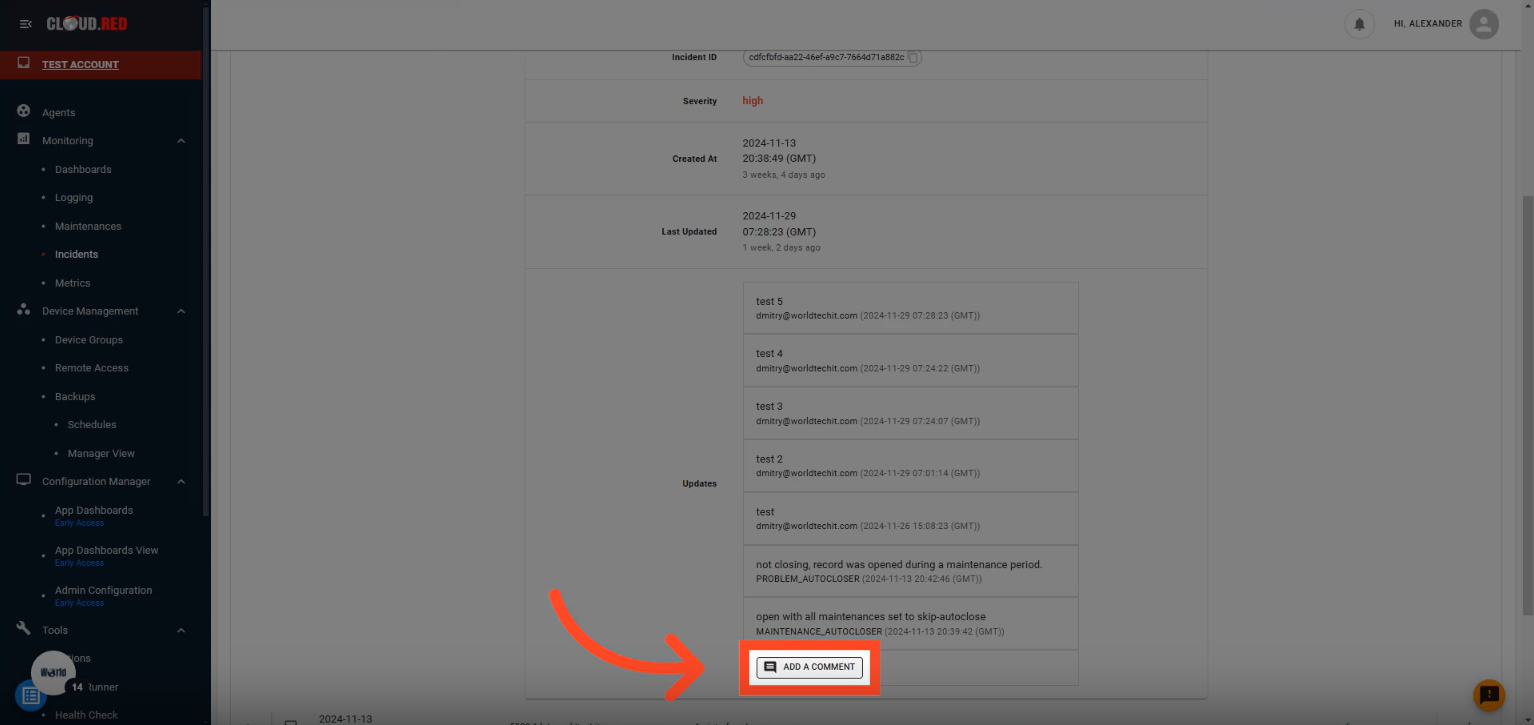
<img className="block h-96 dark:hidden" src="https://mintcdn.com/cloudred/XLCPZIg1Q1S_lH4Z/native-monitoring/incidents-images/view-comments.png?fit=max&auto=format&n=XLCPZIg1Q1S_lH4Z&q=85&s=32c1eb802fe86ba010582ebc643fc7d4" width="1534" height="725" data-path="native-monitoring/incidents-images/view-comments.png" />

<img className="hidden h-96 dark:block" src="https://mintcdn.com/cloudred/XLCPZIg1Q1S_lH4Z/native-monitoring/incidents-images/view-comments.png?fit=max&auto=format&n=XLCPZIg1Q1S_lH4Z&q=85&s=32c1eb802fe86ba010582ebc643fc7d4" width="1534" height="725" data-path="native-monitoring/incidents-images/view-comments.png" />
